

-
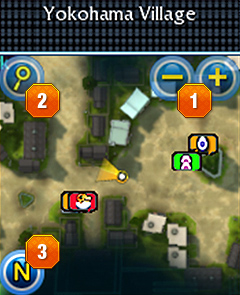
 Maximize / Minimize
Maximize or Minimize the size of the map.
-
 Map reading
Clicking on the magnifier shaped icon on the left top corner
will let you zoom in. Once the map is zoomed, you can find
more details on locations and etc. By clicking on the arrow
on the left top, you can cover larger areas with the map
which enables you to check on brief information on traveling
routes. -
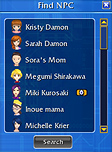
 Find NPC
Click 'N' on the bottom left corner of mini map to open NPC list.
Simply, select the one you want to find and click on Find button. You'll be guided
to the NPC location.
Minimap Icon |
Description |
|---|---|
 Tamer's location Tamer's location |
Tamer's location is marked as a white dot. Yellow triangle coming from the white shows the direction of view. |
 New Quest New Quest |
Shows the location of NPC looking for help. This indicates that a new quest is available. |
 Daily Quest Daily Quest |
Shows location where you can get a repeatable quest. |
 Completed Quest Completed Quest |
Shows location where you should complete the quest by reporting a result and receive rewards. |
 Mercenary Hatchery Mercenary Hatchery |
Place for hatching Mercenary Digimon from the DigiEgg. |
 Scan/Return DigiEgg Scan/Return DigiEgg |
Shows location where you scan/return DigiEgg. |
 Storage Storage |
Shows location of storage where you keep your items. |
 Portal Portal |
Shows Portal, the passage between maps. |